Posts

Best Ways to Maximize your Window Speed

Image
Your Windows PC don’t have to slow down over time. If your PC has gradually become slower over time or it suddenly gets halt after a few minutes of usage, there are  reasons for your PC to be slow. Just like all the general PC issues, you don’t need to be afraid to give your computer a reboot if something is not going as usual. That can fix a few problems and is lot faster than attempting to manually fix the problem by troubleshooting yourself. Clean Your PC the Easy Way using CleanMyPC If you want to clean-up your PC in the easiest way possible,  CleanMyPC  is a great tool you should look at to get the job done, and it will help you to keep your computer clean without any work. Unlike the other competitors, it also includes other great tools like a Clean Uninstaller, to that helps to get rid of applications and clean up the junk that they leave behind. Download CleanMyPC for Free Today Close System Tray Program...

HOW TO RENAME MULTIPLE FILES IN A SINGLE CLICK

Image
Hello Friends,                         I am again comeback with an interesting PC tricks for you.I hope you will learn new things. Windows Explorer (known as File Explorer in Windows 10) is surprisingly powerful where you can easily rename one or more files just with it also you can do even more with the Command Prompt. Obviously you all know how to rename a single file, but let’s start from the start since the advanced tricks build off them. Click to select the file and then click the “Rename” button on the Home menu. Click to select file and then click the name of the selected file. Right-click the file and then select “Rename” on the context menu. Also using keyboard you can just use your arrow keys (or start typing the file name) to select a file and then hit  F2  to select the file name. Once you have got the file name selected you will notice only the file name itself is selected, not ...

How to edit videos online

Image
Hello Friends,                         I am again comeback with an interesting PC tricks for you.I hope you will learn new things. Make amazing, intresting  and fantastic movies in your any  web browser as you want . 💓 There are some amazing free video editors around, but if you don't have the time or inclination to download a dedicated program, you'll be pleased to learn that there are now superb online tools that put a powerful movie-making suite in your web browser. We've put all the best browser-based video editors through their paces, and in our opinion Movie Maker Online is by far the best. It lets you upload large video clips, images and audio files, edit them individually and arrange them in a timeline-style interface. There are filters, fades, and even royalty-free music to give your video a professional look. Your finished video will be exported in MP4 format ready for sharing online, and ther...

How to Convert Numbers in to Words(In Indian Rupees)

Image
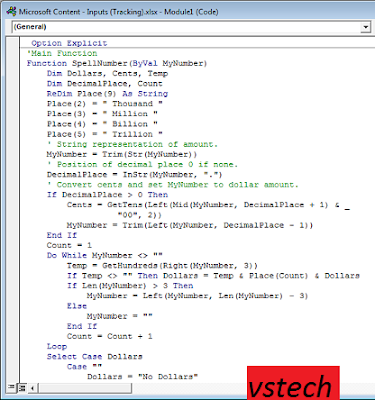
Hello Friends,                         I am again comeback with an interesting PC tricks for you.I hope you will learn new things.Here now  How to Convert  Numbers in to Words(In Indian Rupess). Following function convert ( Rupees in figure ) numeric value in a Microsoft Excel worksheet cell into its equivalent in (Rupees in Word ) English words. e.g.it is the formula..  =SpellNumber(45 )will display as Rupees forty five rupees only. Follow  instructions care fully>>> How to create the sample function Called SpellNumber Start Microsoft Excel. Press ALT+F11 to start the Visual Basic Editor. On the  Insert  menu, click  Module . Type the following code into the module sheet. After copying following code, Enable macro and use above function. How to Convert  Numbers in to Words(In Indian Rupees)Add caption Function SpellNumber(amt As Variant) As Variant D...

Turn off your computer/Laptop with CMD(Command Prompt)

Image
Hello Friends,                         I am again comeback with an interesting PC tricks for you.I hope you will learn new things. It's very useful to learn how to use command line to shutdown a Windows 10 computer when Windows file crashes or computer screen freezes or other stuck errors that prevent system shutdown. Follow the steps below strictly and try to turn off your pc/Laptop.   Start->Run->CMD   Type "shutdown" in the open command prompt window;   List of various choices that you can do with the command will be listed down;   Type "shutdown /s" to Shutdown your computer;   Type "shutdown /r "to Restart your windows PC;   Type shutdown /l" to Log off your computer   Type "shutdown /a"to Abort the shutdown process before the timeout;    Type shutdown to know more choices in system shutdown process. So i hope this will be helpful for you. You c...

DIFFERENT WAYS TO TURNOFF PC/LAPTOP/WINDOW10

Image
Hello Friends,                         I am again comeback with an interesting PC tricks for you.I hope you will learn new things.  Shut down or restart using the Start Menu The simplest and most basic method of closing down Windows 10 is by using the Start Menu, which is the default option in the latest Microsoft operating system. To do this, first, open the Start Menu by clicking the Windows button on the bottom left corner of the screen. Then, click or tap Power. Three options appear: choose Restart to reboot the device, Shut down to shut it down completely or Sleep to put it into sleep mode. If the Start Menu is set to fullscreen mode, or if you're using Windows 10 in tablet mode, things will look a bit different, but you’ll still need to tap the same Start button to access the Start Menu and open its Power sub-menu. Windows 10, shut down, restart

HOW TO BLOCK OR UNBLOCK USB PORTS IN WINDOW 10/7/8

Image
Hello Friends,I am again comeback with an interesting PC tricks for you.I hope you will learn new things.  HOW TO BLOCK OR UNBLOCK USB PORTS IN WINDOW 10/7/8             How often have you witnessed blocked Pen drive or USB drive access in your workplace or college or school,office? I believe many times; in fact, every time you try to use the USB drive, you are not allowed, simply because the administrator has disabled USB drive detection on your Windows system. Again, how often has your data been stolen because someone connected an unauthorized USB to your computer and copied your files?  Well, you don’t need to worry because the solution to disable or enable USB Ports is very simple. Restrict access to USB drives There are many ways an administrator can prevent using of USB Drives Here is the some tricks you can learn in few easy steps: Altering registry values for USB Mass Storage Devices. Disabling USB Ports from Device Manager....